How to Use the PetBizAI T&C Assistant: A Step-by-Step Guide
If you've been putting off sorting your Terms and Conditions because it feels complicated, expensive, or time-consuming, this guide is for you. The PetBizAI T&C Assistant is designed specifically for pet business owners, many of whom have never used an AI tool before. You don't need any technical knowledge. You just need to know how your business works, the tool does the rest. Here's exactly how to use it, step by step.

What Is the PetBizAI T&C Assistant?
The PetBizAI T&C Assistant is an AI-powered tool that generates a customised set of Terms and Conditions for your pet business, based on your answers to a series of simple questions. It's not a generic template — it builds your T&Cs around your actual services, your cancellation policy, your location, and how you work with clients.
It lives inside petbizai.app and is available to PetBizAI members. The whole process takes around 10–15 minutes, and you'll end the session with a document ready to use with clients.
Who Is the T&C Assistant Designed For?
The assistant is built for any UK-based pet business owner who provides a service directly to clients and their animals. This includes:
Dog groomers and mobile groomers
Dog walkers and pet sitters
Dog trainers and behaviourists
Pet physiotherapists and hydrotherapists
Canine hydrotherapy centres
Veterinary nurses offering mobile or private services
Boarding and home boarding providers
You do not need any legal knowledge or AI experience to use it.
How Do You Get Started on PetBizAI.app?
Getting started takes less than two minutes. Here's how:
Go to petbizai.app
Log in or create your free account
From your dashboard, select T&C Assistant from the tools menu
You'll be taken to a simple chat-style interface — this is where the AI assistant lives
The assistant is conversational. It asks you questions one at a time, in plain English, and you answer in your own words. There are no complicated forms to fill in.
What Questions Will the T&C Assistant Ask You?
The assistant guides you through a series of questions that cover every key section of your Terms and Conditions. You don't need to know what T&Cs should contain — the assistant knows, and it asks you the right things.
Here's a summary of what it covers:
About your business
What type of pet business do you run?
What services do you offer?
Do you work from a fixed premises, mobile, or at clients' homes?
What area of the UK do you operate in?
Your booking and payment process
How do clients book with you?
Do you require a deposit? If so, how much and is it refundable?
How do clients pay, and when is payment due?
Your cancellation policy
What notice do you require for cancellations?
What happens to deposits if a client cancels late?
Do you have a no-show policy?
Health and safety requirements
What vaccinations do you require?
Do you have any breed or age restrictions?
What do clients need to disclose before booking?
Emergency procedures
Are you happy to authorise emergency vet treatment if needed?
Who is responsible for veterinary costs?
Photography and data
Do you photograph animals in your care?
Do you want to include consent for social media use?
Answer each question as honestly and specifically as you can. The more detail you give, the more accurate your T&Cs will be.
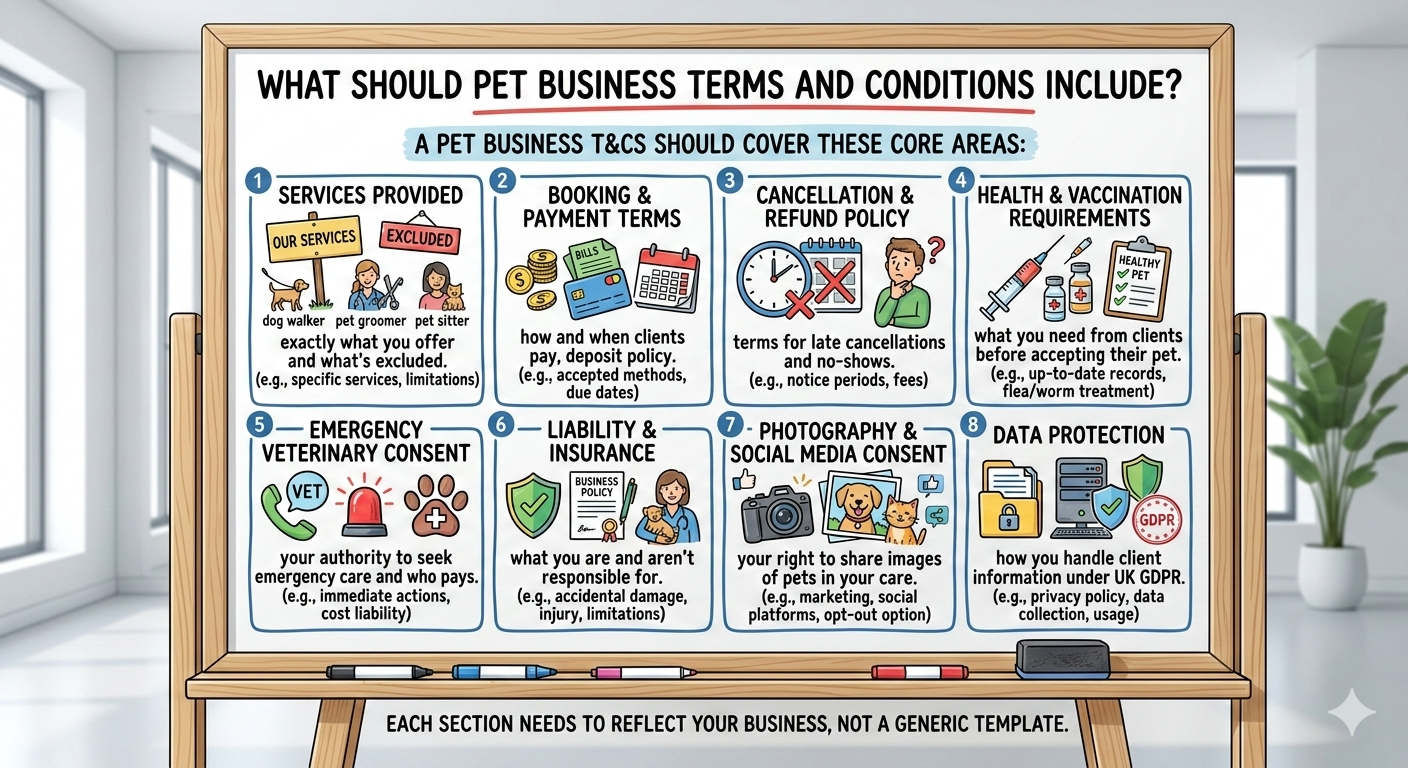
Illustrated infographic showing the key sections every pet business Terms and Conditions should cover, including services provided, booking and payment terms, cancellation and refund policies, health and vaccination requirements, emergency veterinary consent, liability and insurance, photography consent and data protection.` Created with Image Generator Nano Banana in Petbizai.app
What Happens After You Answer the Questions?
Once you've completed the question sequence, the assistant generates your full Terms and Conditions document. This typically takes 30–60 seconds.
You'll be presented with:
A complete T&C document written in plain English
Sections clearly labelled and structured
Your specific answers woven into the relevant clauses
At this point, you can:
Review the document directly in the app
Edit any section if something doesn't look right
Copy the text to paste into your website, booking system, or client onboarding documents
Download it as a text file to save or share
Can You Edit the T&Cs After They're Generated?
Yes — and you're encouraged to. The AI generates a strong first draft based on your answers, but you should always read through the document before using it with clients.
Things to check:
Are your service descriptions accurate and complete?
Does your cancellation policy reflect exactly what you want to charge?
Are your vaccination requirements up to date?
Does the tone feel right for your business?
You can go back into the assistant at any time to regenerate sections or update your T&Cs as your business evolves.
Is the Document the T&C Assistant Creates Legally Binding?
The document generated by the PetBizAI T&C Assistant is written to be clear, professional, and enforceable as a contract under UK law. However, it is not a substitute for professional legal advice.
For most small pet businesses, the T&Cs generated by the assistant will be perfectly adequate as a working document. If you face a specific legal dispute, or if your business has particularly complex arrangements (for example, if you employ staff or run a larger operation), we recommend seeking advice from a qualified solicitor.
The assistant gives you a solid, professional starting point — which is what most pet businesses are missing entirely.

How Often Should You Update Your T&Cs?
Review your Terms and Conditions at least once a year, and whenever something significant changes in your business. Trigger points for updating include:
Adding new services or changing how you work
Changing your pricing or payment terms
Moving premises or changing your service area
A dispute that highlighted a gap in your current T&Cs
Changes to UK legislation affecting small businesses
The PetBizAI T&C Assistant makes it easy to run through the process again and generate an updated version whenever you need one.
What If You Get Stuck Using the Assistant?
The assistant is designed to be self-explanatory, but support is available if you need it. Within the app, you'll find:
Help prompts alongside each question
Example answers to guide you if you're unsure
A support chat if you run into any technical issues
Most pet business owners complete the process in a single session without needing any help at all.
The Bottom Line: Is the PetBizAI T&C Assistant Worth Using?
If you run a pet business and you don't have clear, written Terms and Conditions — yes, absolutely. The assistant is faster than writing T&Cs from scratch, more tailored than a generic template, and far more affordable than hiring a solicitor for something at this stage of your business.
It's one of those tasks that feels like admin but is actually protection. Ten minutes now could save you hours of stress (and real money) further down the line.
→ Ready to create your Terms and Conditions? Head to petbizai.app and try the T&C Assistant today.
→ Missed the earlier posts in this series?
Does Your Pet Business Really Need Terms and Conditions? — Post 1
What Should Be in a Pet Business's Terms and Conditions? — Post 2
Author note: Kirsty Skeates is the founder of PetBizAI, a UK-based AI consultancy helping pet professionals save time and protect their businesses using accessible AI tools. She has worked alongside groomers, trainers, walkers, and physiotherapists across the UK for over a decade.
Related Guides for Pet Business Terms and Conditions
Explore more guides on creating, understanding and managing Terms and Conditions for your pet business.



Learn how to use the PetBizAI Terms and Conditions Assistant to generate customised T&Cs for your pet business. This step-by-step guide shows groomers, walkers, trainers, canine physiotherapists and hydrotherapy businesses how to create clear policies covering cancellations, payments, liability and emergency vet consent.